
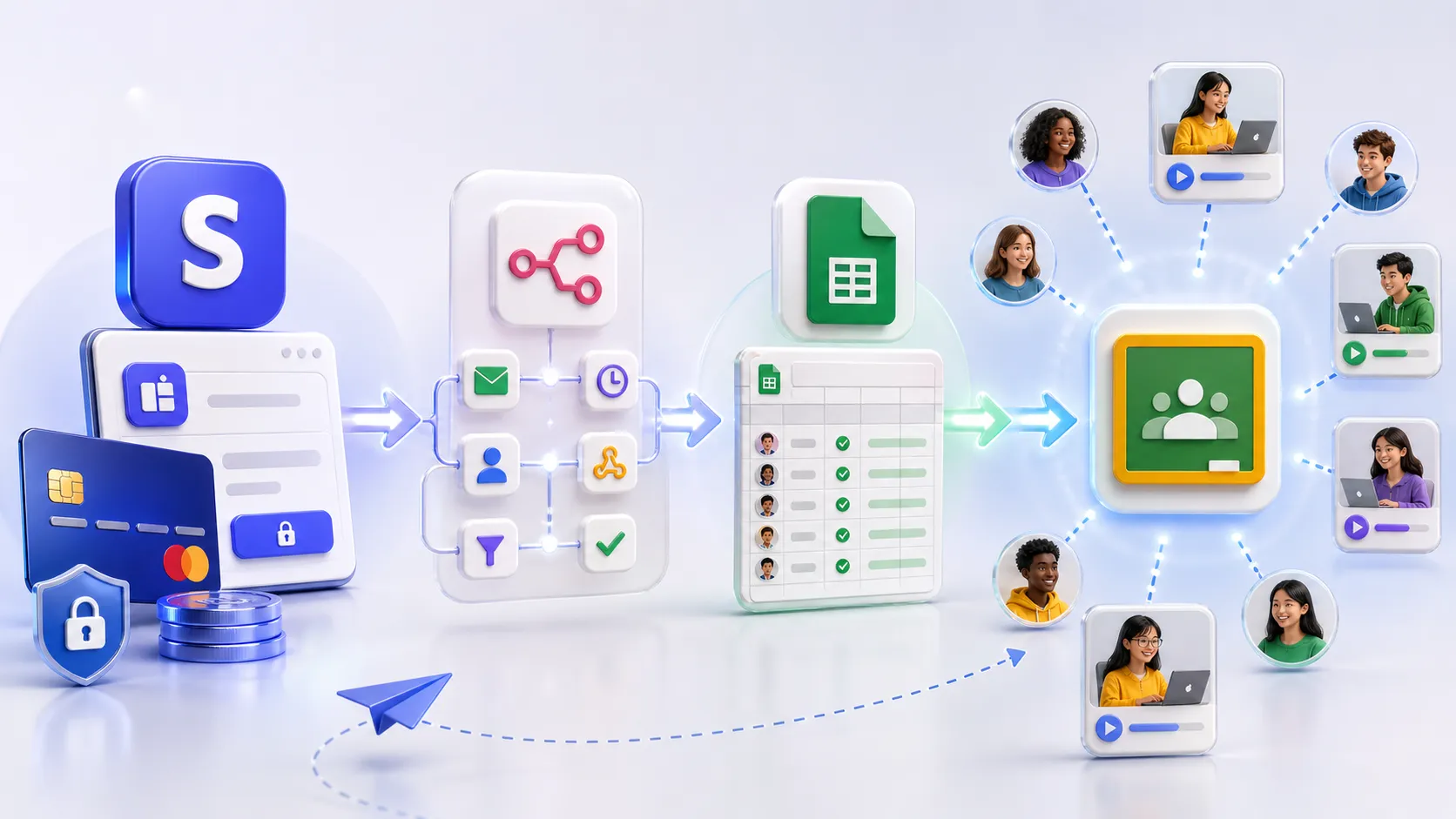
Did you know that Google Classroom can be adapted for paid mini courses? Classroom itself does not process payments and is not a full platform for selling courses, but when combined with Stripe, n8n, Google Sheets, and Telegram, it can become a simple system: the user pays, access opens automatically, and the administrator sees the status in a spreadsheet and notifications. In our new article, we show a practical case and explain when this setup makes sense, and when it is better to choose Tutor LMS or a separate LMS platform.
Not every course needs a separate online learning platform from the beginning. If it is your first mini course, a closed training program, internal training, or a pilot launch, the main question is often not where to build a “large online school”. The question is simpler: how the user pays, how they receive access, how we see the status, and how we avoid losing an order if one of the services temporarily returns an error.
When we were preparing our own mini course about building a multilingual website on WordPress and WPML, we faced exactly this task. It was not enough to record lessons and prepare materials. We also had to design the operational part: payment, course access, buyer register, administrator notifications, and error scenarios.
We could have chosen a ready-made LMS platform. LMS, meaning Learning Management System, is a system for managing online learning: lessons, students, access, progress, tests, certificates, payments, and communication. This is a normal path when a full online school is needed. In our case, however, part of the infrastructure already existed: Google Workspace, Google Classroom, Google Sheets, WordPress for landing pages, Telegram for quick notifications, and n8n for process automation.
So instead of starting with a new platform, we decided to test another approach: whether it is possible to build a simple, controlled course sales system within the existing ecosystem, adding only the payment layer and automation.
What we wanted to achieve
We did not need a complex system. We needed a clear process:
- the user pays for course access through Stripe;
- the system checks whether the product, amount, currency, and payment status are correct;
- payment information is automatically written to Google Sheets;
- access to Google Classroom is not granted chaotically, but placed in a queue;
- a separate automation picks up the queued record and creates a course invitation for the student;
- the access status is updated in the sheet;
- the administrator receives a Telegram notification;
- if an error appears, the system shows the reason instead of silently failing.
As a result, we created a lightweight internal system: Stripe accepts the payment, n8n connects the services, Google Sheets works as a payment and access register, Google Classroom remains the learning environment, and Telegram reports the result.
How the process works in simple terms
The user goes to a Stripe payment page and buys access to the course. After a successful payment, Stripe sends an event to n8n. The first automation workflow receives this event, normalizes the data, and checks the basic conditions: whether the product, amount, currency, payment status, and buyer email match.
If everything is correct, the record goes to Google Sheets with the status “paid” and “queued for access”. If something does not match, for example an incorrect payment link, a different amount, or an empty email field, the record does not continue automatically and is sent for manual review.
The second workflow runs separately. It regularly checks the sheet, finds records waiting for access, picks one record, marks it as “processing”, and contacts the Google Classroom API. API, meaning Application Programming Interface, is a programming interface that allows one service to communicate with another. In our case, n8n sends a request to Google Classroom and creates a course invitation for the student.
After Google Classroom responds, the system updates the row in the sheet. If the invitation has been created, the status changes to “access sent”. If Google Classroom does not accept the email, the administrator sees that a Gmail address or a company Google Workspace email is needed. If Google temporarily limits the number of requests, the system schedules another attempt for later.
Why we separated payment and access granting
The key decision in this setup was not to combine payment and access granting into one rigid chain.
The payment may go through correctly, but Google Classroom may return an error at the same moment. For example, because of a temporary request limit, account permission issues, or an email address that cannot join the course. If everything is built as one direct process, it is easy to end up with a situation where the payment exists, but access has not been granted, and it is unclear at which step the process stopped.
That is why we created two separate workflows:
- the first one receives and verifies the payment, then places access in a queue;
- the second one handles the queue, grants access, and writes the result.
This gives several practical benefits. The payment is not lost if Google Classroom is temporarily unavailable. Access can be granted one by one, without mass parallel requests. Errors are visible in the sheet. A retry can be made automatically or manually. Most importantly, the administrator does not see a vague “something does not work”, but a specific status for each order.
The role of Google Sheets: not just a spreadsheet, but an operational register
In this system, Google Sheets acts as a simple register. It shows who paid, which product they bought, which email they provided, how much they paid, whether access has been granted, how many attempts were made, and whether an error occurred.
At the beginning, this is more practical than immediately building a separate database or admin panel. The sheet can be opened by the course owner, administrator, support person, or technician. There is no need to enter server logs, search through JSON responses, or analyze a database.
Of course, Google Sheets is not an ideal database for a large platform with thousands of active students, complex reports, and many roles. But for a mini course, test launch, or first product version, it is a clear and sufficient tool.
Why Telegram is used here
Telegram is not a mandatory element in this setup. It can be replaced with Google Chat, Slack, Microsoft Teams, Discord, email, or a CRM. CRM, meaning Customer Relationship Management, is a system for managing clients, inquiries, statuses, and interactions.
The important thing is the principle of fast notification. After payment, the administrator receives a short message: who paid, what amount went through, which course was purchased, which email was provided, and what happened with the access. If Google Classroom rejected the email or manual verification is needed, that is also visible immediately.
For a small educational product, this reduces the amount of manual checking. There is no need to constantly open Stripe, Classroom, and the spreadsheet. The system itself reports when everything is fine or when a person needs to act.
Why Google Classroom
Google Classroom does not look like a classic commercial platform for online courses. It does not have a built-in cart, sales pages, affiliate program, or marketing funnels. But it works well where materials, assignments, lesson structure, communication, and access for specific participants are needed.
For a mini course, this may be enough. Especially if the company already works in Google Workspace and does not want to add another platform only for functions that partially already exist in the tools it uses.
Another advantage: access to the course is connected to a Google account. The student does not simply receive a public link that can be forwarded to anyone. They receive an invitation to a specific course and enter a closed learning environment.
What about video and content protection
During the project, we also checked how video works inside the Google ecosystem. It is important not to overstate it: neither Google Classroom nor Google Vids is a full DRM protection system. DRM, meaning Digital Rights Management, is a special system for controlling access, licenses, and keys for digital content.
In practice, this means the following: if the video is available only to specific users inside the Google ecosystem, it is harder for an ordinary student to simply copy a stable direct link to an MP4 file. Access works through the account, sharing permissions, and the user session. However, this does not mean the video cannot be copied at all. A technical user may look for workarounds, and screen recording cannot be fully blocked.
For this reason, we do not position this setup as “strong anti-piracy protection”. It is controlled access, suitable for a mini course, internal training, or a lower-priced educational product. For expensive video courses where content protection is critical, other video delivery methods should be considered.
When this setup makes sense
The Google Classroom + Stripe + n8n + Google Sheets + Telegram model works well if:
- you are launching your first course or mini course;
- you already use Google Workspace;
- you do not need an advanced student dashboard;
- you do not need automated certificates;
- the course has a limited number of participants;
- fast launch and cost control matter;
- you want to see all payments and accesses in a simple register;
- you do not need a “large online school”, but a stable process: payment, access, notification, control.
In this scenario, a separate LMS platform may be unnecessary at the beginning. It will provide more features, but it will also add a new subscription, a new working logic, a new panel, new limitations, and a new dependency on another platform.
When Tutor LMS or a separate platform is a better choice
This setup is not universal. If you need a full online school, it is worth considering Tutor LMS, LearnDash, Teachable, Thinkific, SendPulse Courses, Kwiga, or other platforms.
We also have experience configuring courses based on Tutor LMS. This is a different class of solution. Tutor LMS works inside WordPress and gives more possibilities for a full online school: student dashboard, course structure, lessons, tests, certificates, access rules, payment integrations, WooCommerce, and branding adjusted to the company.
This approach is better if:
- there are many courses;
- a dedicated student dashboard is needed;
- certificates, tests, and learning progress matter;
- subscriptions or course bundles are needed;
- a strong branded platform is required;
- education is a separate business line, not only a pilot product.
So the question is not which one is better in absolute terms: Google Classroom or Tutor LMS. The question is what stage the product is at and what needs to be solved now.
Stripe Payment Link or WooCommerce
In the first version, you can start with Stripe Payment Link. It is a quick way to accept payments without building a full store. For testing a mini course, this is enough: there is a payment page, there is an event after a successful purchase, and there is a webhook for automation.
However, if there are more courses, coupons, orders, customer accounts, invoices, or upsells, meaning additional sales after the main purchase, then moving to WooCommerce becomes more logical. In this setup, WordPress and WooCommerce become the sales layer, while n8n remains the access automation center.
The development path may look like this:
- first test: Stripe Payment Link + n8n + Google Classroom;
- regular sales: WordPress or WooCommerce + n8n + Google Classroom;
- full online school: WordPress + Tutor LMS or a specialized LMS platform.
What we achieved
After testing, we received a practical system in which:
- Stripe accepts the payment;
- n8n checks the event and runs the automation;
- Google Sheets keeps the payment and access register;
- Google Classroom accepts the student into the course through an invitation;
- Telegram reports the payment, access, or problem;
- errors are not lost, but written to the sheet;
- access can be placed back into the queue after checking;
- the setup can be cloned for another course.
This does not replace a full LMS in every scenario. But for a mini course, closed training, internal product, or first launch, it may be enough. Especially if the company already pays for Google Workspace and uses WordPress and automation in its daily work.
Risks to consider
There are several important technical and organizational points in such a system.
First: the Stripe webhook must be configured carefully. A webhook is an automatic HTTP request from one service to another after a specific event. For payment events, it is important to verify that the event actually comes from Stripe and has not been forged.
Second: Google Sheets contains buyers’ personal data: email, name, amount, and access status. Therefore, access to the sheet should be limited only to responsible people.
Third: the payment email and the Google Classroom email may be different. In future versions of such a system, it is worth adding a separate “Google email for access” field to avoid situations where someone pays from one address but wants to enter Classroom from another.
Fourth: Google Classroom should not be treated as a full commercial platform with marketing infrastructure. It is a learning environment that can be connected with payment, a spreadsheet, and automation, but it should not be expected to provide all LMS functions.
What this means for course owners
If you are launching a course, you do not have to buy a large platform immediately. First, it is worth answering a few simple questions:
- how many courses do you plan to sell;
- how many students do you expect at the start;
- whether certificates and tests are needed;
- whether a student dashboard is important;
- where the materials are currently stored;
- how you want to accept payments;
- whether the team already works in Google Workspace or WordPress;
- what should happen after payment: access, email, invoice, notification, CRM entry.
The answers to these questions determine what will be better: quick automation on Google Classroom, a full system on Tutor LMS, or a ready-made external LMS platform.
Conclusion
Google Classroom does not have a built-in payment system and is not a classic platform for selling courses. However, when combined with Stripe, n8n, Google Sheets, and Telegram, it can become a simple system for paid access to a mini course.
For a first launch, this may be more practical than immediately buying a separate platform. You use what you already have, avoid duplicating tools, and see the entire process: payment, register, access, errors, and notifications.
For a larger online school, many courses, certificates, tests, and a student dashboard, it is better to consider Tutor LMS or dedicated LMS platforms. But for a mini course, pilot project, or closed training program, Google Classroom with well-designed automation can be a fully working solution.
Want to discuss your own setup?
If you plan to sell a course and are not sure what to choose: Google Classroom, Tutor LMS, WooCommerce, or a separate course platform, you can start with a short analysis of your situation.
Tell us how many courses you plan to sell, where you currently store your materials, how you want to accept payments, and what should happen after purchase. We will compare the possible options, show the risks, and propose a setup that can be launched without unnecessary technical complexity.
Aroks Digital Marketing & Services helps with WordPress, WooCommerce, Tutor LMS, Google Workspace, n8n, CRM integrations, and process automation around inquiries, payments, access, and notifications.